Your data
Home & Insights
Home is your daily briefing. Halo reads what happened across your connections and writes a short summary at the top, with tappable highlights, followed by insights that need your attention and the latest from your task widgets.
Where it comes from
Everything your connections pick up, like a new email, a calendar change, a delivery or a workout, becomes an event on your timeline. Tap the calendar icon on Home to see it. The built-in Insights task reads new events and turns the important ones into insights and todos, and marks them done when they’re handled.
What you can do with an insight
- Perform Research asks Halo to dig deeper and write a briefing. View Research opens it.
- View Email opens the message it came from.
- Ignore dismisses it. Halo learns from what you ignore.
Pull down on Home to refresh. Halo also refreshes on its own, at most once an hour and again at midnight.
Proactive AI
Tune how much Halo does on its own in Settings›Proactive AI.
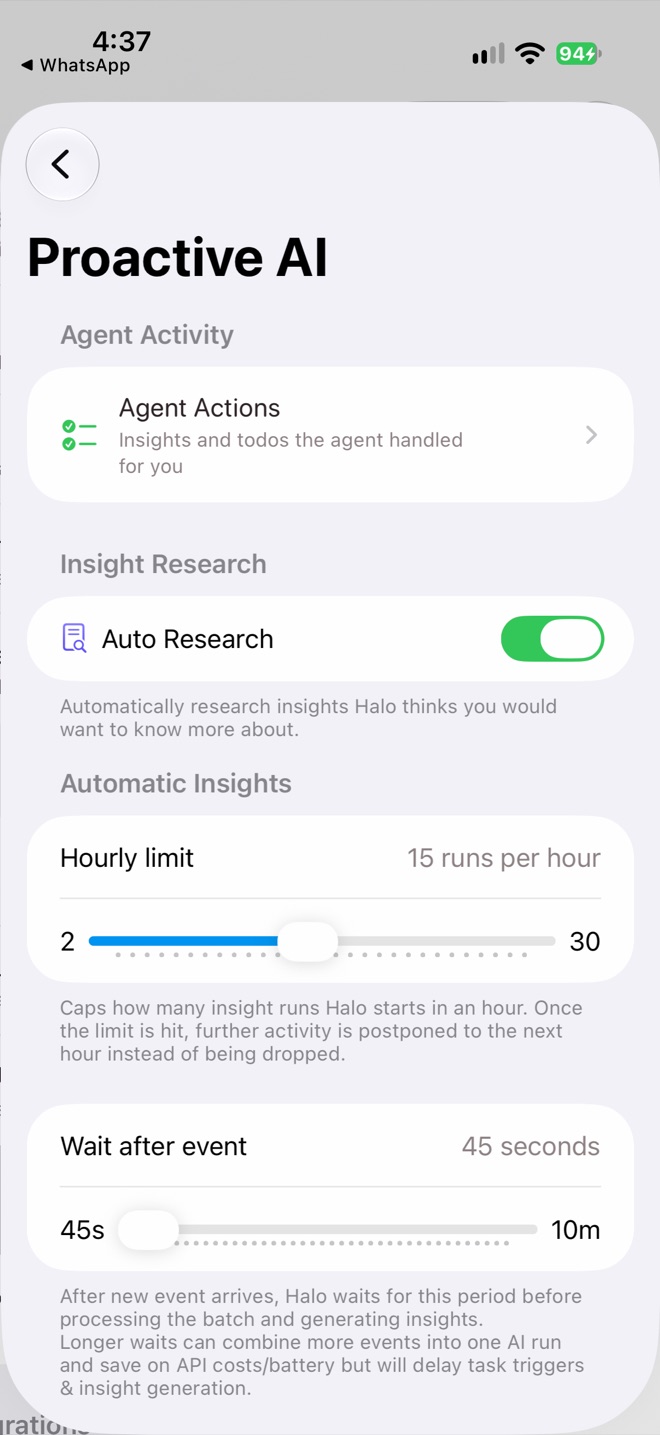
Settings › Proactive AI
| Setting | What it does |
|---|---|
| Agent Actions | A log of insights and todos Halo handled for you, like completing “buy milk” after a grocery receipt arrives. |
| Auto Research | Lets Halo research insights automatically when it’s useful. |
| Hourly limit | The most insight runs per hour (2–30, default 15). |
| Wait after event | How long Halo waits after something new happens before writing insights (45 seconds to 10 minutes), so related events are handled together. |
| iMessage | How often message conversations are checked. |
Primary device only
Insights, summaries and research are written by your primary device and sync to the others. Your actions, like completing a todo, save from any device.
Related