Automation
Skills
Skills are folders of instructions, scripts and files that teach Halo how to do something specific, like convert documents to Markdown, manage App Store Connect, or write in a certain format. Manage them in Settings›Skills.
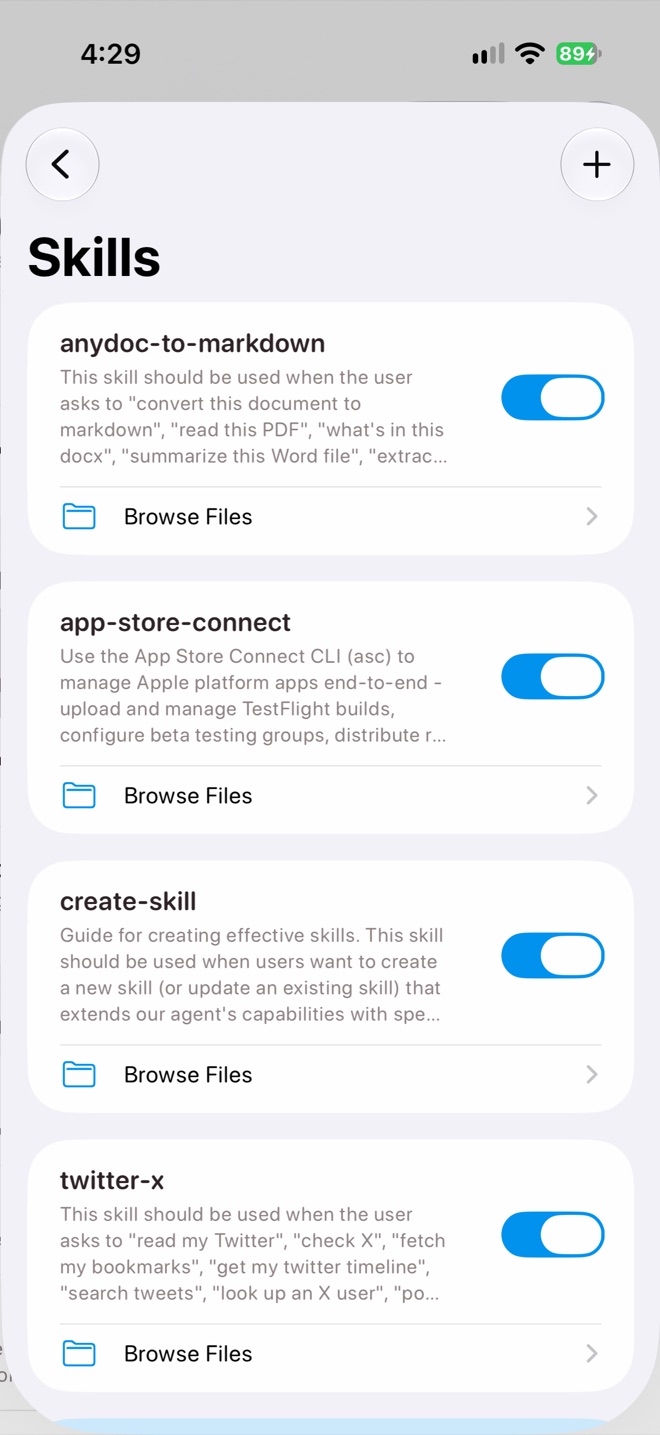
Settings › Skills
Install a skill
- Import from Website: browse to a skill on GitHub, tap Add, and confirm Install skill?
- Import ZIP: install one or more packaged skills from Files.
- Or ask Halo to write one: the built-in create-skill skill helps it build a new skill from a conversation.
Each skill has a switch to turn it on or off and Browse Files to look inside. Installing a skill with the same name asks before replacing it.
What’s in a skill
Every skill has a SKILL.md with a name, a description that tells Halo when to use it, and the instructions. It can include scripts and other files.
---
name: expense-report
description: Use when the user asks for an expense report from receipts.
---

# Expense report
1. Find receipts in Photos and email from the requested dates.
2. ...
Scripts run in Halo’s built-in Linux terminal. If a skill needs an API key, add it in Settings›Environment Keys.
Only install skills you trust
Skills can run code in Halo’s terminal with access to your workspace. Read a skill before installing it.
Related